Adding DMARC for domains is rather straightforward in both our hosting-panel.net solutions and cPanel.
To comply with the changes being implemented by Google, Yahoo and others, it's recommended to configure a DMARC record for domains, even with a policy set to none.
Note: setting a quarantine or reject DMARC policy will have an effect on your email delivery if your DKIM or SPF records are misconfigured.
Go to Domains -> DNS:
Click the "Add New Record" button.
In the "Name" column you enter _dmarc, type should be TXT, TTL can be the default and in the record you put v=DMARC1;p=none; and click "Save zone changes".

Note: We automatically set a default none policy for new domains added in hosting-panel.net since Feb 2nd 2024.
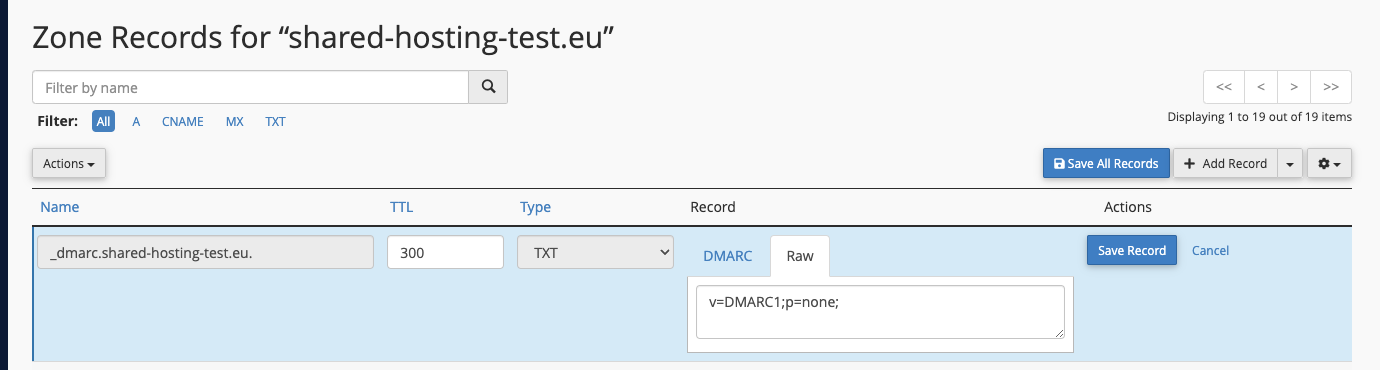
Go to Zone Editor -> Manage:
Click on arrow (▾) on the right side of "Add Record", and choose "Add DMARC Record":
Go to the "Raw" tab, and put v=DMARC1;p=none; and click "Save Record".